
Tyler County Court Record Requests
Each court in Tyler County has its own record keeper. The Tyler County District Clerk holds files for the 1A and 88th District Courts. Those cover felony, family, and higher-level civil cases. The Tyler County Clerk serves the constitutional County Court. That office keeps county criminal, civil, probate, and mental-health records. A precinct clerk holds the justice-court files. Woodville or Ivanhoe Municipal Court keeps its own city records. Narrow your request so the clerk can find the right item quickly.
- Identify the court, cause number, case type, party name, and approximate date.
- Check a published docket, re:SearchTX, iDocket, or the public terminal when available.
- Call the District Clerk at 409-283-2162 or County Clerk at 409-283-2281 if the custodian is unclear.
- Name the exact docket sheet, filing, order, or judgment and state whether certification is needed.
- Confirm the current fee and delivery method before paying.
How you ask depends on the record. Mail, email, phone, fax, and counter service each have their own rules. The Texas Public Information Act will not replace a direct court-file request to the Tyler County clerk.
Four Tyler County Record Custodians
Records follow the court, not just the county name. A justice-court appeal can move into County Court. When that happens, part of the file history sits with a second Tyler County clerk, so ask which office holds the exact order now.
| Custodian | Typical record | Route |
|---|---|---|
| District Clerk | 1A or 88th District felony, family, and civil file | District Clerk office |
| County Clerk | County Court criminal, civil, probate, and related file | County Clerk office |
| Justice clerk | Precinct traffic, small claims, debt, and eviction file | Named precinct |
| Municipal clerk | City Class C or traffic file | Issuing city court |
Match your request to the right office. A felony search at a city payment page goes nowhere, and a city ticket request sent to the District Clerk fails too. Those offices keep different Tyler County record sets.
Kinds of Court Records
A docket is only a road map. It indexes the case and lists its procedural steps. It is not the full file. Tyler County files can hold papers that never appear as free links on any calendar. County records may include civil pleadings, criminal papers, and probate applications. They can also hold citations, writs, abstracts of judgment, guardianship or testamentary letters, and signed orders. District files add felony documents, family pleadings, civil motions, and judgments.
- Docket sheets and dated setting lists
- Petitions, applications, answers, motions, and notices
- Orders, judgments, dispositions, and writs
- Probate letters, citations, and reports where public
- Ordinary copies, certified copies, and available electronic images
Not everything is open. Mental-health, juvenile, sealed, and expunged material stays protected. A public docket line does not mean an item can be copied. Probate reports cause their own confusion. Tyler County posts monthly probate reports for parts of 2024 and 2025. A report is neither the full probate docket nor the file. The clerk's probate work can include citations, writs, letters, notices, inventories, and orders. Ask for a named document rather than requesting "everything probate."
Tyler County Email and Mail
Tyler County's civil page lets you send a Civil Case Information Sheet by mail or email. That filing route is not a general document-request portal. Criminal records take a different path. Call for the page count. Pay through the county credit-card route and keep the payment ID. Submit the county form, and a non-certified copy can then be emailed. The county allows 24 to 48 hours for that email workflow. Certified copies cannot go out by email. For a mailed criminal request, send a check or money order with a self-addressed stamped envelope. Expect three to five business days for the return. The County Clerk lists fax 409-283-8049, but confirm acceptance before faxing anything.
Give useful details: List the court, full cause number, party or entity, rough filing date, exact paper, and certification choice.
Court Records: What They Contain
Tyler County offers several views of the same court records. A district criminal PDF is titled "Record of Criminal Actions." County Court pages publish dated settings. re:SearchTX may show summaries, parties, attorneys, events, documents, pages, prices, and access status, but no single record carries every field.
| Cause number | The court identifier, with any prefix or suffix. |
|---|---|
| Court and type | The district, county, justice, or municipal court and case category. |
| Parties | Public party and counsel details, subject to redaction. |
| Events | Filings, settings, pleas, resets, orders, or judgments. |
| Documents | Available pleadings or orders, sometimes with pages or price. |
| Disposition | An outcome entry best read with the signed order. |
A listed balance or document price can change. The final amount may differ from what the screen shows. Confirm all charges with the Tyler County clerk.
Tyler County Terminal and iDocket
The County Clerk's 2016 search notice says public computers were available in the office. It also points to iDocket for criminal access. Current vendor tables still list Tyler County County, though the search form fields remain unverified. Vendor counts and freshness dates are not certified clerk facts. Call the office before counting on terminal hours or portal scope. The statewide re:SearchTX portal handles case and hearing searches. It may display events or purchasable documents. Some functions require registration. If a Tyler County result does not appear, retry the name or number. Then ask the local clerk, because missing online data does not prove no case exists. The vendor listing reflects portal freshness only, not each new filing in an older case.
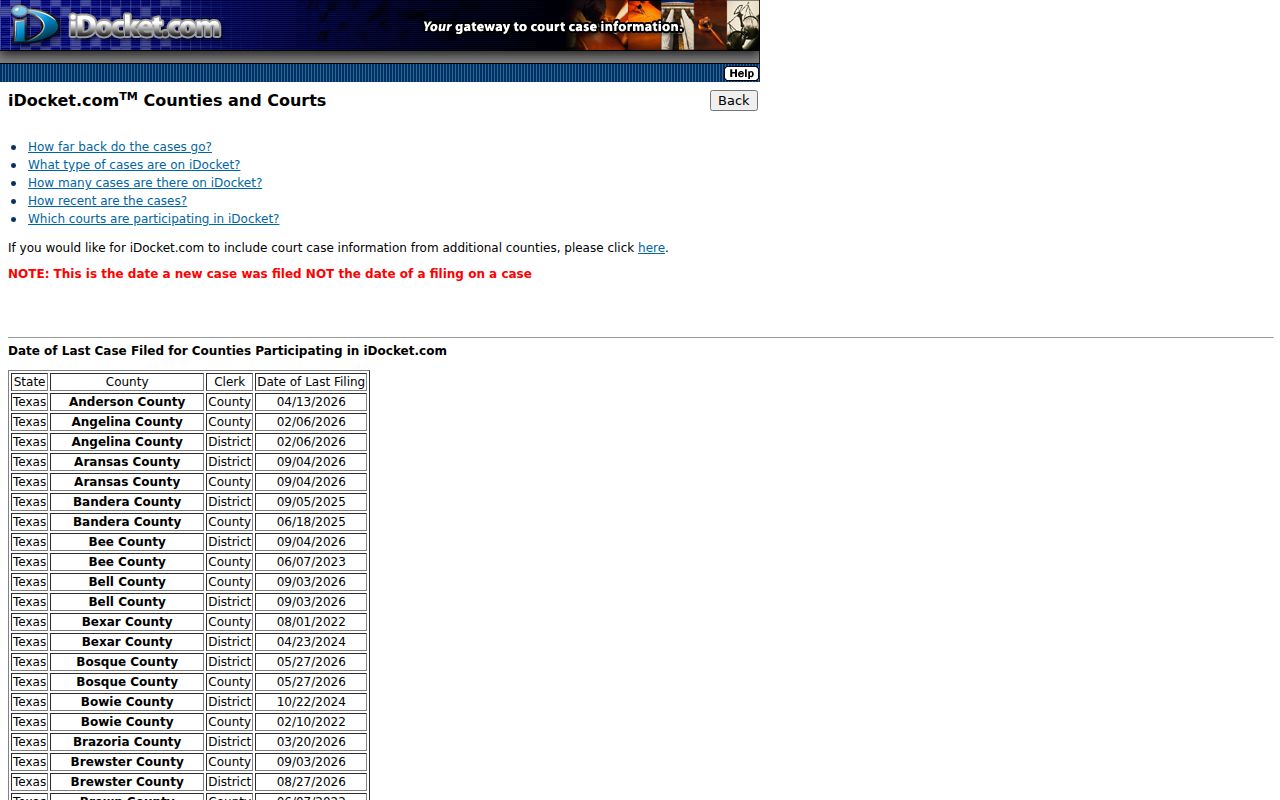
The vendor display carries its own date. For a current copy, the Tyler County clerk remains the source.
Copy Fees and Certification
An ordinary copy just reproduces the page. A certified copy adds the clerk's formal certification, which costs more. The current Tyler County fee page warns that fees may change, and one civil, probate, and criminal line is ambiguous. Request a quote for a large file.
| County Clerk item | Published amount |
|---|---|
| Copy per page | $1.00 |
| Certified copy | $5.00 plus $1.00 per page |
| Faxed or emailed copy | $1.00 per page |
| Search fee | $5.00 |
| Civil, probate, or criminal line | $1.00 per page for first 10 pages, then $0.10 per page, subject to confirmation |
An older search notice lists $1 per page plus $5 for certification. The live fee schedule is newer, though the clerk should still confirm your total before you pay.
The official fee page posts the current schedule.
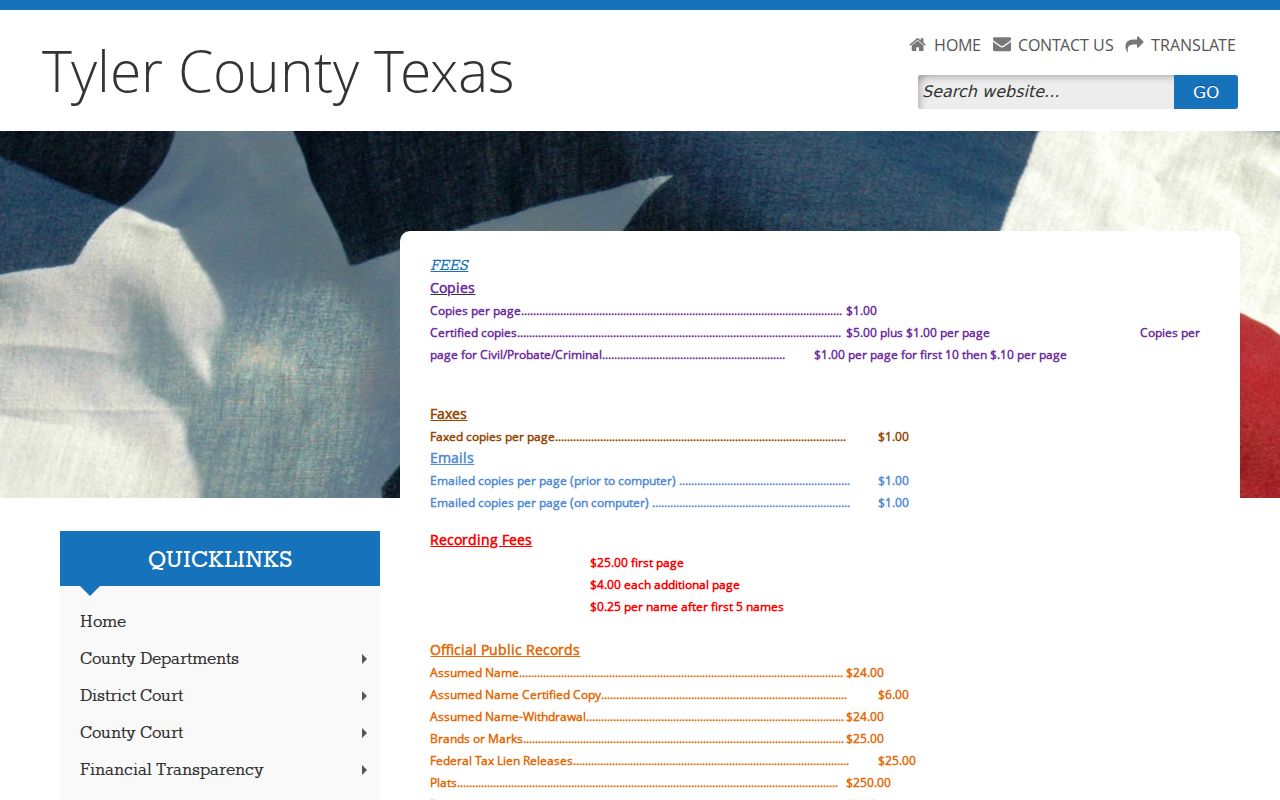
This source supports planning, not a guaranteed quote.
Tyler County Clerk
116 South Charlton Street
Woodville, TX 75979
409-283-2281
Tyler County Records Since 1836
Tyler County's record-keeping stretches back to 1836, when the County Clerk's office began. Not everything from those early decades behaves like a modern digital file. Some series live in bound books, and some in computer indexes. The switch happened at different times for different record types. The Official Public Records page lays out civil, probate, criminal, UCC, and Commissioners Court indexes, along with those book-to-computer cutoff dates. Its real-property image service is a separate system. It is not a paid case-docket feed. Older Tyler County court records sometimes sit somewhere else entirely. The Texas State Library guide points to Tyler County microfilm kept at the Sam Houston Regional Library and Research Center in Liberty. That archive sits in Liberty. For historical or genealogy work, let the local clerk check the current index first. Then make an archive inquiry. Include the record series and date range. The county's official index page spells out the book, computer, and image distinctions.
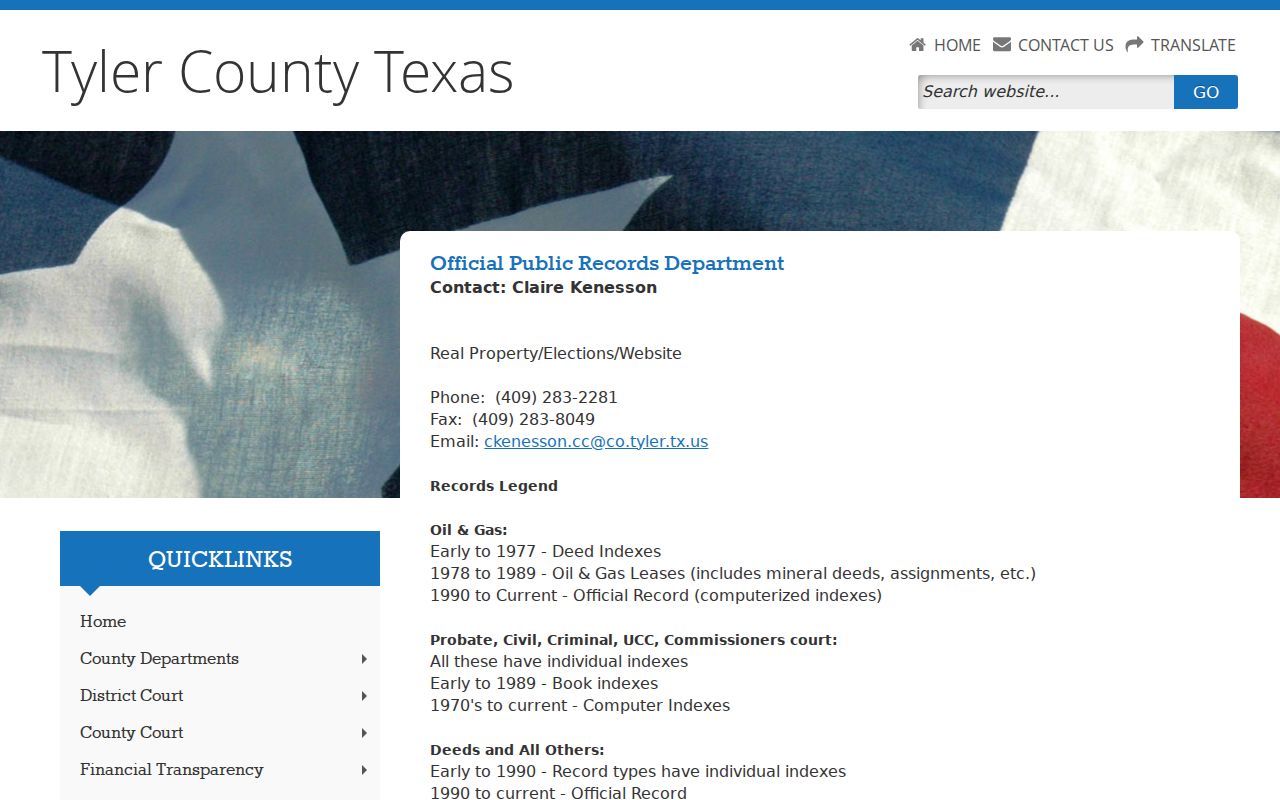
Those ranges route old requests but do not replace custodian confirmation.
Access Rules for Court Records
Court files play by their own access rules. Texas Government Code Section 552.0035 puts judiciary information under Supreme Court rules, other law, and judicial rules instead. So the Texas Public Information Act is not the usual route into a Tyler County case file.
Key access rules:
Texas Rule of Judicial Administration 12 governs defined judicial records, subject to exceptions.
Texas Rule of Civil Procedure 76a states the civil sealing framework.
Texas Family Code Chapter 58 limits juvenile-file access.
Even "public" has limits. Expunction orders, nondisclosure rules, redactions, and case-specific orders can all restrict what a clerk releases. Few fields end up online. Before assuming, ask the originating clerk whether a redacted Tyler County copy can be issued.
Verify Tyler County Record Results
A dated PDF can confirm a setting. That is a start, not a finish. re:SearchTX may show a summary, hearing, event, or document. iDocket may help you locate an entry. But none of these replaces a signed order or a certified Tyler County copy when exact contents matter. Start with the Tyler County docket search to get the cause number. Then return to the office that holds the record.
Check the date and scope of whatever source you use. A calendar PDF may cover a single day's settings, nothing more. An iDocket freshness date reflects when the case was new, not each later filing. A re:SearchTX document label can lead to a priced item rather than a free image. A clerk's screen print counts as an ordinary copy, not a certified record. Those distinctions matter when you confirm an outcome. They also matter when you trace a historical case or hand a court paper to another office.
Schedules shift, so call first. The District Clerk page posts Monday through Thursday hours. It also notes a Friday closure effective August 5, 2026. The County Clerk lists weekday hours. County notices may announce other closures, so phone ahead before traveling, especially near a deadline. When you verify, name the Tyler County court, the exact paper, and the certification level. If a clerk cannot find a cause number, recheck the court level and the spelling. Check the date range too. Also confirm whether the case began in a city or justice court. Read any reset, dismissal entry, or plea setting alongside the actual Tyler County order or judgment.