
How the Tyler County Court Calendar Works
No single Tyler County court calendar covers every court and case type. The County Court Dockets page posts criminal settings sorted by category. Categories include plea, pretrial, cite-and-release, failure-to-appear, felony-pending, motion-to-revoke, and jury-trial dates. The County Clerk keeps the County Court records themselves. For probate, the County Judge office is the scheduling contact. Justice and municipal settings stay elsewhere. They remain with whichever court mailed the notice.
The District Clerk archive holds dated criminal and motion-to-revoke PDFs. These cover the 1A and 88th District Courts. Think of these as setting sheets, not a master district calendar. Keep the court name, category, date, and PDF date together when you note a hearing.
Tyler County Court Schedule Sources
Each source answers a different question about a Tyler County court date. County Court relies on a calendar index. The District Clerk files annual archive pages that lead to PDFs. re:SearchTX gives a statewide hearing view, and a direct call to the court catches a late change.
| Source | Best use | Limit |
|---|---|---|
| County Court Dockets | County criminal dates | A category date does not prove a named case is listed |
| District archive | District criminal PDFs | A dated setting snapshot |
| re:SearchTX | Statewide hearing cross-check | Coverage may differ from the clerk record |
| Clerk or coordinator | Current confirmation | Use the office for the right court |
The captured 2026 District Clerk page shows the archive layout.
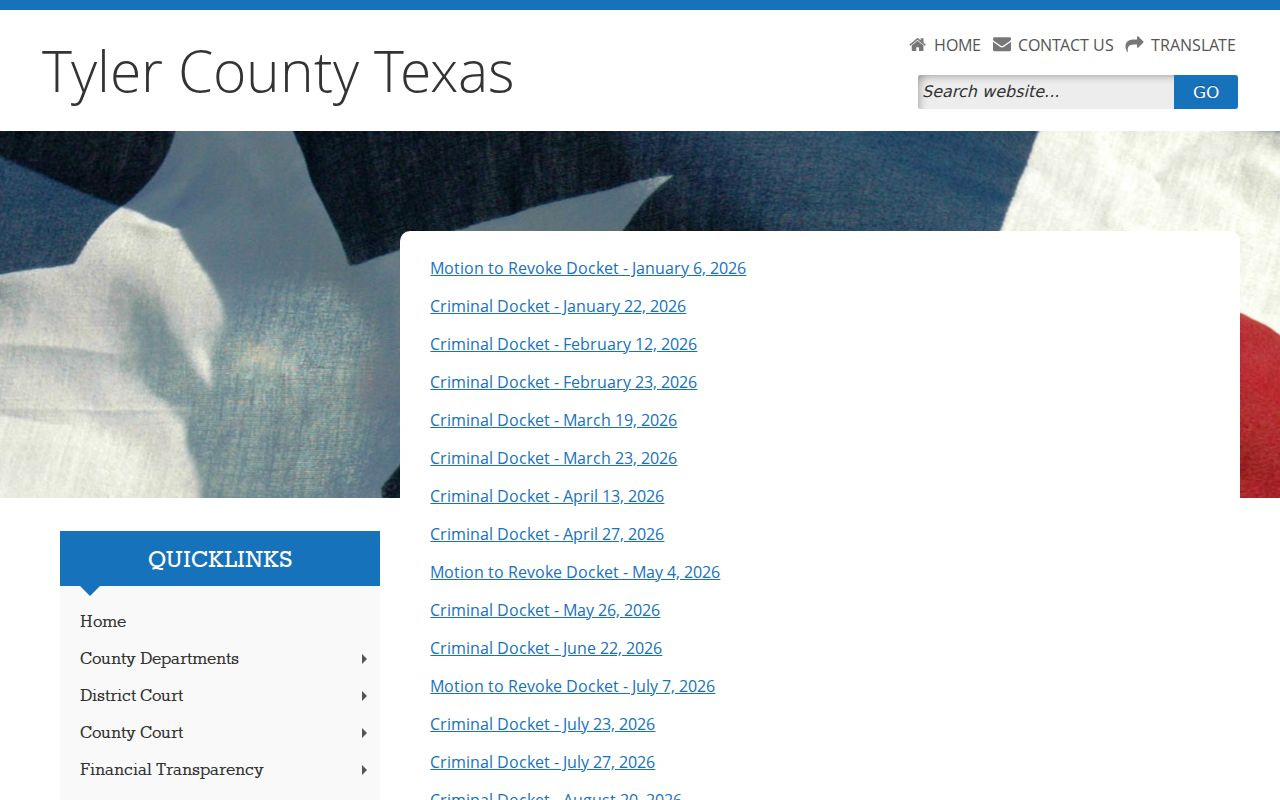
The linked PDF and clerk supply the case-level details behind that index.
Tyler County Court Date Lookups
A Tyler County court date lookup goes fastest with the full cause number and the court. Lacking either, work from the paper that brought the case to your attention. A citation usually points to justice or municipal court. A district cause number belongs to the District Clerk.
- Check the County Court date index or District Clerk annual archive and open the matching PDF.
- Use re:SearchTX, select Hearings, and open the hearing type for details.
- Call the correct clerk. The District Clerk lists 409-283-2162 for district matters.
- Ask at the correct clerk counter and check any current printed calendar there.
- Confirm the date, time, court, and setting type with counsel and the court before travel.
Tyler County has no central feed that reports cancellations. When an older PDF, a statewide result, and the latest notice disagree, the clerk or coordinator who set the hearing settles it.
Tyler County Docket Setting Terms
A setting label tells you why a matter was scheduled. It never states the outcome. Local pages use several terms marking steps in the process.
- Plea docket
- A setting where plea matters may be addressed, not proof of a plea result.
- Pretrial
- A setting before trial for motions or case management.
- Cite and release
- A County Court category for cases routed through that process.
- Motion to revoke
- A proceeding on a request, not proof revocation was ordered.
- Reset
- A changed setting whose new date needs confirmation.
Failure to appear also appears as its own category. Read the whole row, any later events, and signed orders before drawing a conclusion.
Court Settings: What Each Field Means
The district sample is titled "Record of Criminal Actions" and lists cause number, time, party, attorney or bondsman, type, offense date, and action fields. The County Court plea sample plays a similar calendar role. Neither one is the full case file.
| Date | The scheduled day, not a filing or result date unless labeled that way. |
|---|---|
| Time | The docket call or setting time. Confirm any separate arrival rule. |
| Courtroom | The room, court, or division if shown. Do not assume one location. |
| Judge | The judge or court assigned to the matter. |
| Setting Type | Arraignment, plea, pretrial, motion to revoke, or jury trial. |
Copy every prefix and suffix in the cause number. Tyler County district, county, justice, and municipal courts share no single calendar desk.
Tyler County Calendar Is Not Outcome
A Tyler County docket name means one thing. The case was listed when that sheet was made. Nothing more. It proves no attendance, guilt, dismissal, or sentence. The April County Court sample shows entries moving to a plea docket and hearings resetting. That is exactly why a calendar has to be followed forward.
Look instead for a later disposition or a signed order. re:SearchTX can display events and documents, but the originating clerk keeps the official file. Once you have the cause number, run the Tyler County docket search.
When a Tyler County Court Date Moves
A reset is a setting that moved. A continuance is a postponement the court authorized. A blank result or missing PDF proves neither. Only the court can change its own order.
Check the county home page, the correct clerk page, and the newest docket. After a September 2, 2026 power outage, Tyler County posted a closure. It said probate court would be rescheduled. That is a good reminder that a saved calendar can go stale fast.
Write down both the old and new entries, then ask which written notice controls. Woodville states that its continuances are never granted by phone. That city rule should not be read onto other Tyler County courts.
Three Tyler County Date Checks
For a setting that matters, use three layers. Read the county PDF, check re:SearchTX. Then confirm with the office that owns the record. The PDF preserves what was published. The portal gives another view of the court docket. Direct contact is what catches a late reset, closure, or room change.
If the sources conflict, give the clerk the full cause number, the court, the party name, and the date shown. Ask which setting controls. Keep the source link and note when you confirmed it.
Best record: Save the date, time, court, setting type, cause number, source, and confirmation details.
Missed Tyler County Settings
Act quickly after a missed Tyler County setting. Identify the court from the notice. Then reach that court or its clerk. If a lawyer is on the case, tell counsel at once. Ask whether an order, warrant, bond action, new court date, or appearance instruction was entered.
Missed a setting? A missed date may lead to a failure-to-appear entry or other court action.
Contact the named Tyler County court, clerk, or attorney at once for the current status and written instructions.
A licensed Texas attorney can advise what the missed date means and how to respond.
A removed online entry does not prove the matter ended. The current case record controls.
Tyler County Annual Date Patterns
Calendar patterns are a decent starting point for a Tyler County court docket. They narrow the search. They cannot replace confirmation on the case itself. The County Court 2026 index posted plea dates from January through September, set a jury-trial span in early October, and listed no County Court dates for November or December. Cite-and-release dates ran across all twelve months. Treat these as likely categories for the calendar, not a standing rule that next year will look the same.
Always check the year printed on the official index. An older annual page can stay online for a while. A linked PDF may cover only one setting type, so read its scope before trusting a row. For an older event, the District Clerk keeps a prior-year archive, though it will not tell you the next hearing date. Before you rely on anything, match the year, the court, the cause number, and the setting type. That match is what makes a docket entry trustworthy.
Keep simple notes as you go. Write down whether your information came from an index page, a PDF, a statewide hearing detail, or a straight answer from the clerk. Note the day you checked it. Good notes make later changes easier to trace. They also keep a date from one Tyler County court from being confused with a setting in another court.